


Ultimate Guide: How to View Your American Heart Association (AHA) Ebook
Welcome to this comprehensive, step-by-step guide on activating and viewing ebooks from the American Heart Association (AHA)! AHA ebooks are packed with valuable, evidence-based information.
So you registered for an emergency CPR Course and purchased an AHA BLS student manual? Follow these steps to activate your American Heart Association eBook Access Code. Please note Save A Life CPR is not able to offer support for AHA eBooks. Please contact the AHA directly with any questions.
🛠️ Prerequisites: What You’ll Need Before Starting
Before jumping in, gather these essentials to ensure a smooth experience:
-
- American Heart Association eBook: Purchase an American Heart Association BLS eBook directly from us and have it delivered to your email instantly.
Purchase The BLS eBook here: https://savealifecpr.enrollware.com/schedule#ct281062
- American Heart Association eBook: Purchase an American Heart Association BLS eBook directly from us and have it delivered to your email instantly.
-
- AHA Account: If you don’t have one, create it for free at ebooks.heart.org.
-
- Device Compatibility: Works on Windows, macOS, iOS, Android, or web browsers (Chrome, Firefox, Safari).
-
- Internet Access: Needed for initial setup; offline mode available after download.
Step-by-Step Instructions on Accessing and Viewing Your AHA Ebook
- Click the login button at eBooks.heart.org
- Enter account details or choose “Create an account”.
- Enter your CaSE SEnSiTIvE access code into the box at the top left of the page.
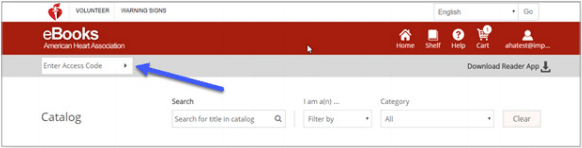
- The AHA eBook or video will be added to your Shelf after successful code entry. Click on your ebook to start viewing it.
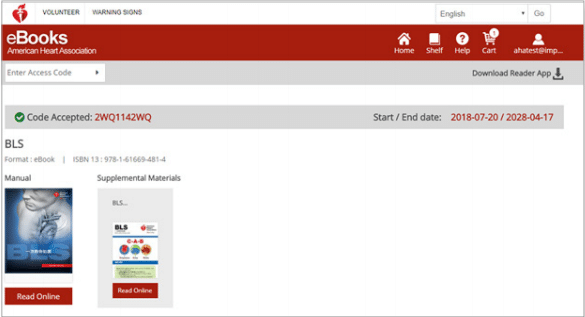


Congratulations! You’ve read to view your AHA ebooks. Remember, AHA updates content regularly, so check back for new editions. If you have any technical issues, please contact the AHA.
AHA’S CUSTOMER SUPPORT INFORMATION
1-888-AHA-8883 (1-888-242-8883)
[email protected]
Mon – Fri:8 a.m. – 5 p.m CST